
AMSTRAD PCW 8512 / SCHNEIDER JOYCE PLUS
Technical Specifications
| Processor | Zilog Z80A at 4MHz with wait states. |
|---|---|
| RAM memory | 512 KB internal. 368 KB RAM disk. 61 KB user memory. |
| ROM memory | No boot ROM. |
| Chips | Amstrad-designed Gate Array, uPD765 disk controller. |
| Graphics | 720×256 pixel resolution in graphic mode with 90×32 text (90 columns x 32 lines) (monochrome). The screen is mapped in lines anywhere within the initial 128 KB, storing the reference in 512 bytes called roller-RAM. |
| Sound | Fixed-frequency generator. Output through internal speaker (no volume control). |
| Connections | Expansion bus, and connectors for the keyboard and printer (PCW-specific). Expansion connector. |
| Internal Storage | Two disk drives: One 3“ 180 KB per side drive. A second 3” 720 KB drive, formats the disk in one go. |
| Monitor | Green phosphor incorporating 2 three-inch bays on the front right. 13-inch screen. |
| Keyboard | 82 plastic keys in QWERTY/QWERTZ/AZERTY format depending on the country. |
| Printer | Dot matrix impact printer with a 10-inch carriage. 80 columns. 20 characters per second (N.L.Q.), 90 characters in draft quality. |
| Price | Spain: 109,800 ptas. - England: £000 - France: 0,000 F |
Description
Alan Sugar decided to boost the PCW 8256, taking another step further into the world of small business computers. Once the companion model to the great CPC 6128—the long-awaited PCW 8256—was on the market, and in view of the success achieved by the latter, the British firm decided to “improve upon the present” and released a more advanced model: the PCW 8512. With it, the main limitation of the “256” was eliminated: its program and data storage capacity. By adding a second disk drive and a —refreshing— 256 KB expansion for the virtual disk (internal RAM), the 512 became a machine that allowed for much more fluid work by comparison. The possibilities it offered were, naturally, greater than those of the baby of the family, the 256. Finally, there was enough memory to actually work.
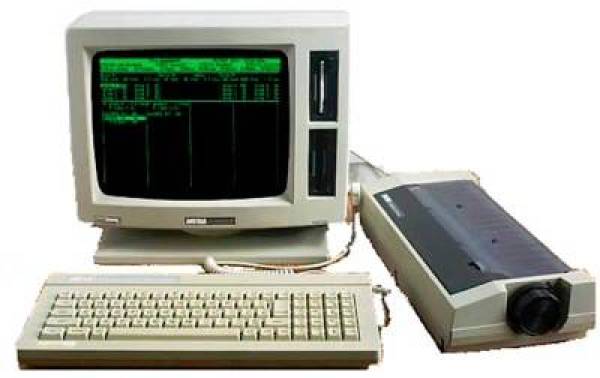
Externally, when the unit is turned off, the 512 is barely distinguishable from the “little” 256. The color is slightly darker, the labels tell us we are looking at a 512, and most importantly, there is the disk drive located below the first one, right where the 256 has the plate indicating the monitor is green phosphor. Otherwise, everything is exactly the same: the printer, monitor, and keyboard are the same as on the 256, which have already proven their reliability.
Upon turning on the unit and loading the system disk, we find more differences: the startup message is noticeably different. Instead of 112 KB of internal memory, we find 368 KB—that is, an additional 256 KB. A pleasant surprise; at last, we can have complete programs on the virtual disk, among other things, which is no small feat. In addition to this, the monitor informs us that we have two units installed. It is worth mentioning here that it is possible to have a 256 with a second disk drive but without the internal memory expansion, which would place us halfway between the two models. The difference is notable, and the resulting device is a hybrid I wouldn't dare to qualify.
On the PCW 8512, the first disk drive is exactly the same as the one in the 256. The second one is considerably more powerful. In this case, the formatting varies; it is “denser,” which allows for storing a larger amount of information. The disk length is better utilized. And take note: drive B formats both sides at the same time. Therefore, the user should not panic if they mistakenly format (initialize) a disk in drive B the same way they do in drive A—that is, first one side and then the other. When done this way, the drive erases the format of the opposite side and, of course, upon verification, it reports that the first address mark is missing on said side. The first thing that comes to a user's mind is a possible defect in the drive. And it is—but a defect of the “unit” sitting in front of the machine.
Let’s look at the capacities: when applying the operating system's SHOW utility to a freshly formatted disk in the second drive, the result shows 706 KB free (not 720, which is what the manufacturer claims). Even so, the difference isn't that great, and this already allows for uses with much more interesting possibilities than those of the smaller member of the PCW family. But everything has its “buts”; it must be said that regarding the second drive, the disks designed for the first one—the so-called CF-2—are valid, but they are not the appropriate ones. For this second drive, the disk type should be the CF2DD, meaning double-sided, double-density. This should be the case because, as mentioned, the information is more condensed due to the formatting, making it more advisable to use a disk with a more sensitive emulsion. Even so, let it be clear that CF-2 disks are valid, although there is a potential risk of them causing problems.
Regarding compatibility between drives, there is also much to discuss: logically, a disk formatted for “720” KB cannot be read in the first drive, which was designed for a 172 KB format. When this mistake is made, the drive emits a sort of grunting sound as a sign of protest against the incorrect usage. One must be careful not to make mistakes because it seems quite easy for a drive to get jammed, and this might very well be a reason for it. In the other direction—from B to A—we find a very nice touch from the manufacturer: a disk from drive A can indeed be read by the second disk drive. This convenience is very useful, especially since it avoids the hassle of having to constantly swap disks.
Disk copying, for instance, is considerably more convenient by reading from B and writing to A. It also proves practical when we need a CP/M utility and both M and A (especially A) are occupied. In short, the combinations are manifold, and all are improvements over the 256. And since we are discussing the disk drives, it is worth mentioning that after working with the computer for a while, a heating of the disks can be noticed which does not seem normal.
It is with the 256 KB memory expansion that the machine truly feels complete. The 368 KB of free space allows us to use the internal memory just as if it were another disk, with the enormous advantage that entails; since the mechanical movement of the drive head and the reading process are eliminated, running programs from M and accessing data is considerably faster. This internal memory effectively replaces drive A in terms of capacity, leaving the latter available for other tasks, such as data storage. Consider how much of an advancement this expansion represents when, counting the 2nd drive, we have over 1 Megabyte available for data storage.
There are no compatibility problems. All programs executable by the 256 are equally so by the 512. What’s more, many programs initially designed for the 256 include routines, in anticipation, to take advantage of the 512's 2nd disk drive. For example, having the program disk in A and the data resulting from its process in drive B. Regarding the software bundled with the equipment, there are no differences, except for the fact that the 512 is supplied with a more advanced version of LocoScript, version 1.21 (this version already came with some of the latest batches of 256 units). The primary difference, aside from some simplifications for faster use (version 1.21 has a window that groups almost all editing options so one doesn't have to go window by window), is that the latest version offers the possibility of converting any created file to ASCII, allowing it to be interpreted by other machines working under CP/M.
On the other hand, the DISCKIT utility, when detecting two installed drives, executes additional routines that do not appear if you use the same disk on an 8256. These routines are, of course, those that provide the options to use drive B with said program. No variations were found in the rest of the software.
Any resignation a 256 user might have felt upon seeing their machine become “too small” is undoubtedly relieved, on one hand, by the marketing of the 512, and on the other, by the memory expansion combined with the second drive. The PCW 8512 is a reliable machine, besides being equipment with a lot of professional potential, perfectly suitable for mid-level management tasks.
With a memory increase that turns out to be four times greater than that of the 256 (706 KB from drive B, plus 320 KB from A, plus 368 KB from M, totaling 1,384 KB), there is no longer any reason to fear falling short.
Amstrad's path seemed clear. Not expansion on the same level, but a gradual ascent through categories. In this climb, the —small— PCW family stands as a solid step. It is clear that it was well-thought-out.
Packaging
The outer packaging is a cardboard box containing, protected by Styrofoam against potential impacts, the green phosphor monitor with built-in 3“ 180KB and 720KB drives, a dot matrix impact printer, a professional QWERTY-style keyboard with “ñ” and accents along with a numeric keypad, the manuals (Volume 1: Locoscript, CP/M, and Logo; Volume 2: Mallard BASIC), and two 3” disks containing the Locoscript v1.21 word processor, CP/M, Utilities, and Dr. Logo. Some units included a promotional program or computer course as a gift with the purchase.
 |  |