
AMSTRAD PCW 9512
Technical Specifications
| Processor | Zilog Z80A at 4MHz. |
|---|---|
| RAM Memory | 512 KB providing a 368 KB M-disk. |
| ROM memory | No boot ROM. |
| Graphics | 720×256 pixel resolution in graphic mode. 90 columns by 32 lines. |
| Sound | No sound. |
| Connections | Centronics parallel interface. Expansion connector for serial interface unit. |
| Internal Storage | 3-inch 720 KB floppy drive. Double-sided, double-density. |
| Monitor | 12 or 14-inch RGB. Black and white (monochrome) with anti-reflective treatment. |
| Keyboard | Professional QWERTY type with built-in cassette. Aerodynamic design. |
| Printer | Daisy wheel with 15-inch carriage, 20 characters per second. |
| Price | Spain: 129,900 ptas + VAT. - England: £449. |
Description
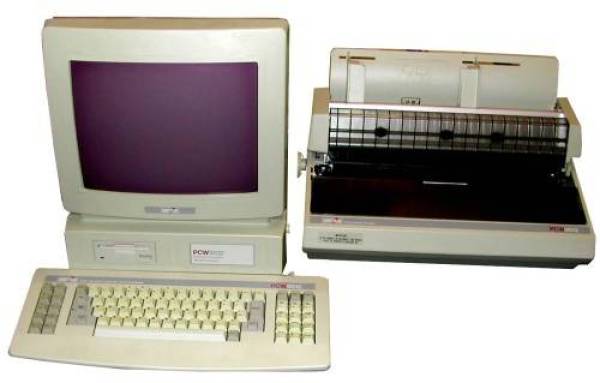
If the 8256 was sold as an amazing machine, we are running out of adjectives to describe the 9512. We will take a look at the PCW 9512 hardware and a deep dive into the software: Locoscript 2 and CP/M.
Externally, this PCW looks nothing like its predecessors. The monitor features a new design, with the disk drive located below the screen on the left. To its right, there is a designated space for a second disk drive.
 |  |  |  |
In the first image, we can see the rear part or back panel of the equipment. Connection for the daisy wheel printer, parallel port, expansion bus, power button, and video sync adjustment. In the second photo, the right side of the monitor with brightness and contrast adjustments. The third photo shows the equipment's motherboard, which stands out in its design for its simplicity, cleanliness, and efficiency. In the fourth image, we can see the connector for the new keyboard.
The disks used are still the three-inch ones, although, as with the second unit of the PCW 8512, the double-sided, double-density format is used, giving us a capacity of 720 KB per disk without the need to flip it over.
The Keyboard
The keyboard of the 9512 has changed in shape, although it essentially performs the same functions as its predecessors in the PCW range. With a more ergonomic design, there is a space right in front of the keys to rest your hands if desired. The shape of each key is reminiscent of a PC keyboard, and its touch is better than on previous PCWs. The keyboard has also been equipped with two small feet on the back, allowing us, if we wish, to work with the keyboard slightly tilted.
The layout of the keys differs somewhat from its “little brothers.” The cursor movement keys and specific Locoscript functions remain on the right, although they are now physically separated from the main QWERTY layout. The hash key (grid key) serves the same function of quickly bringing up the control characters menu after pressing the [+] key, but it also serves to directly call up the spell checker.
The general function keys (the “f” keys) are located on the left, next to CAN, PRINT, ALT, EXTRA, and the [+] and [-] keys. Perhaps the least fortunate aspect is the placement of ALT, which is so necessary in CP/M and is somewhat awkward to access.
 |  |  |  |
The Super-printer
Although it might sound like an exaggeration, a daisy wheel printer plus the rest of the computer and software is a true bargain. That said, continuing with the philosophy of previous AMSTRAD PCWs, the printer cannot be used without the PCW, as it lacks control logic: it is only the mechanism. If we call it a “super-printer,” it is because of its print quality, which is typical of any daisy wheel printer. Additionally, the control software allows for four types of characters with a single daisy wheel: normal, bold, underlined, and bold-underlined. The supplied daisy wheel provides Spanish Pica-10 characters and is a “wide carriage” model (13 inches). Both Locoscript and CP/M allow us to inform the printer control software about the type of paper being used.
 |  |  |  |
The Cons
In addition to the aforementioned placement of the ALT key, we can mention the fact that the monitor is integrated with the central unit, which makes it awkward to orient. However, this inconvenience is offset by the fact that the video tube is treated to prevent reflections, which significantly improves the visibility of characters in unfavorable lighting environments compared to the 8256 and the 8512.
The Pros
Otherwise, the technical specifications regarding memory are similar to those of the PCW 8512: 512 KB of RAM providing a 368 KB M-disk. The printer speed is 20 characters per second—slow compared to the 8256 dot matrix printer in low quality, but not so much if we compare it to the dot matrix in high quality, and one must consider the writing quality of the daisy wheel printer.
Another advantage of this machine is that it includes a Centronics parallel interface from the factory, allowing us to connect a dot matrix printer if we wish, whether for speed reasons or to produce graphics. In both CP/M and Locoscript, we can choose to use the daisy wheel printer or redirect the printing to the parallel port. Now let's talk about the software, whose main similarity with its smaller siblings, the PCW 8256 and PCW 8512, lies in the fact that it is supplied with the CP/M Plus operating system (including the Mallard BASIC and DR LOGO languages) and the Locoscript word processor. And that is where the similarities end, as the CP/M incorporates some new commands for controlling the daisy wheel printer and for receiving files from a disk from previous PCWs, and the word processor is a new version (number 2) with numerous and significant improvements.
The CP/M PLus
Naturally, the CP/M Plus of the 9512 is compatible with that of the 8256 and 8512. However, there are several differences in the BIOS that should not affect the user, but will affect the programmer. We can mention as the most important ones the different format used by the disks (double-sided, double-density) and the hardware access to the keyboard, which can cause problems if one attempts to access it directly in machine code instead of using the BDOS or the BIOS. In fact, programs have been detected that do work on the PCW 8256 and 8512, and on the 9512 they load and run normally, but do not recognize keystrokes.
Regarding the new commands, they are:
- 8000COPY: Allows us to copy the content of several 180 KB disks from the PCW 8000 series onto a 720 KB disk, with the possibility of including the O.S. We can also choose whether or not to copy the Limbo files in the case of Locoscript disks.
- MATRIX: Uses the attributes we indicate to specify the paper characteristics for the printer.
- TIMEOUT: Allows setting CP/M to wait for about ten seconds if a certain output device is not ready before a message appears asking the user what to do, or to wait indefinitely.
- CPMKEYS: This command reinitializes the entire keyboard and any expansion tokens that had been modified with the SETKEYS command, so that the keyboard returns to the state it was in when CP/M was first booted.
- DAISY: Configures the printer to emulate the Diablo 630 and to use the paper with the attributes we specify.
Under the CP/M operating mode, the PRINT key gives us access to the printer status line, but unlike previous PCWs, this status line is triple, and we can view any of the three by pressing the up and down cursor keys. This provides a wealth of information and control over the printer status: we can choose between Daisy Wheel or Dot Matrix; it informs us of the status (ACTIVE, ONLINE, OFFLINE, LEVER UP, COVER OPEN, WAITING FOR PAPER, OUT OF PAPER, NOT CONNECTED); it shows the current line; we can advance one line, advance one page, and set the print quality between low, medium, or high; we can choose between fabric, single-strike, or multi-strike ribbons; we can initialize the printer and choose between continuous feed or single sheets; we can set the paper length in number of lines, as well as the top and bottom margins; we can disable or enable the end-of-paper sensor and choose between four types of daisy wheels; we can change the international character set on the dot matrix printer; we can select the line spacing and character pitch; we can enable or disable automatic line feed, and toggle the hexadecimal print mode. And all of this using just the [+] and [-] keys!
Locoscript
The word processor features notable changes, in addition to the headaches that the new keyboard configuration may cause for those accustomed to a PCW 8256/8512. Some options accessed from the function keys (“f” keys) have been moved, and in general, the paths to access many actions have changed, also due to the addition of new functions. Furthermore, it should be noted that Locomail and Locospell—the standard document or “mailing” generator and the spell checker—are perfectly integrated.
Let's look at some of the innovations: for example, pressing the FIND key brings up the word search menu, which allows us to decide if we want to distinguish between uppercase and lowercase, if we want to search for whole words, and allows the use of “wildcard” characters to search for generic words. For instance, if we tell it to search for “h?la”, it will stop when it finds the word “hola” or the word “hala,” as the question mark serves as a “wildcard character.”
By pressing the CHANGE key, we will see the word replacement menu on the screen, which adds to the FIND options the choice of whether or not to preserve uppercase or lowercase when changing the word. Search by paragraphs, pages, or documents is reduced in the 9512 to manual change or automatic change.
A very important new feature, especially when the disk gets full, is the disk manager during editing, which allows us, among other things, to verify, copy, format, and rename disks.
The ability to see the beginning of the phrases we have in memory is also positively valued, allowing us to see at a glance which one we want to insert.
Regarding the printer, we can choose via menus which printer to use and the paper type, with the ability to define and save various paper settings to our liking. As with Locoscript 1, we have total control over the printer regarding initialization, line and page feeds, etc. Of course, it is possible to use a dot matrix printer connected to the Centronics port as long as the necessary driver is available. Three drivers are supplied with the computer: one for the built-in daisy wheel printer, one for a Diablo 630, and another for Amstrad DMP printers. Accented vowels tend to cause problems with the DMP 3000.
The formatting system is much more manageable than in Locoscript 1. To start with, we can give a name to each format, which obviously makes it easier to remember the characteristics of each one.
The integration of Locomail and Locospell is seamless. We can call up the spell checker while editing a document with just a single keystroke, thereby accessing the correction for the word where the cursor is located. Using the [f7] key provides another access point to the spell checker, allowing us to verify just the word, from the cursor to the end of the document, the entire document, or to update the dictionary.
The use of Locomail is achieved through control characters similar to those used for changing fonts, that is, by pressing the [+] key. Furthermore, we have a special Locomail mini-language available which, unfortunately, the manual barely explains. Amstrad made this mistake quite often—not providing the user with all the information about their computer, especially when dealing with software as interesting as a mailing generator.
In conclusion, the PCW 9512 is a computer much more focused on being used as a typewriter, given the improvement in print quality achieved with the daisy wheel printer and the profound enhancements made to the word processing software. Additionally, it is evident that the computer loses some of its general-purpose capabilities (for example, for graphics), as in many cases it would require the connection of a dot matrix printer which, although easily installable, is not supplied with the computer. Evidently, it is a machine designed for the office.
Packaging
The packaging, much like the PCW 8256 and 8512 series, remains the same: a cardboard box with a polystyrene interior designed to be shockproof to prevent breakage or damage to the units.
 |  |
Manuals
The manual covers and some of the content vary depending on the country where this model was sold. Here are some images to verify this.
 |  |  |