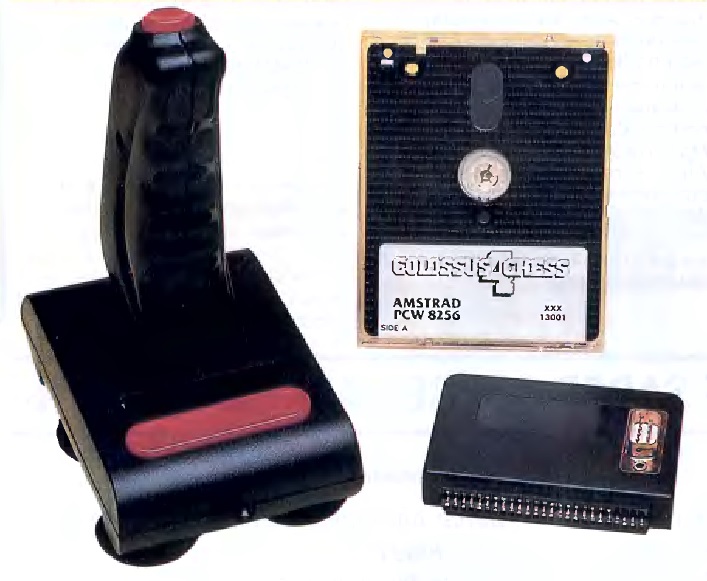
This joystick interface manufactured by Cascade is a peripheral that provides the PCW with a joystick to play games with this computer.
Obviously, playing games on a PCW requires a PCW computer and a game. However, it is always interesting to play games with a joystick for two reasons: one is convenience when controlling the game, especially in action games, and the other is avoiding key wear and tear.
The issue encountered when using a PCW is that this computer lacks a joystick port. For this reason, using an interface like the Cascade Joystick is necessary.
The complete joystick kit includes the interface, a joystick, and a floppy disk containing version 4.0 of the chess game Colossus Chess 2, or another game in some bundles, such as the flight simulator ACE.
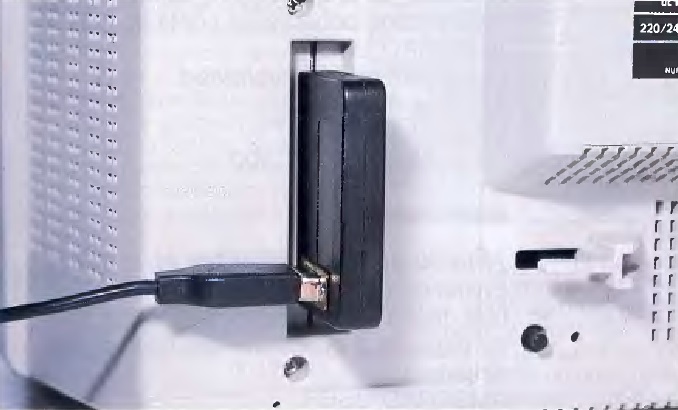
Its usage could not be simpler: just connect the joystick to the corresponding port on the interface, and then connect the interface to the PCW expansion bus (all of this, of course, with the computer powered down). It is important to perform the steps in this specific order because the joystick connection is extremely tight. If we connect the interface first, power on the computer, and then try to plug the joystick into the interface, we will notice that forced pressure is required, creating a risk of accidentally damaging the computer's expansion connector.
The interface runs without any issues with the flight simulator Tomahawk. However, some joysticks bundled with the kit present significant problems, as they fail to fire or register down movements. We assume this is an isolated defect with individual units. Hopefully, it is not a widespread manufacturing issue.
A minor detail should be noted: the interface does not feature a pass-through edge expansion connector, meaning that if connected as the primary device, it prevents chaining any other expansion hardware concurrently.
[ TECHNICAL SPECIFICATIONS AND HARDWARE MAPPING ]
At the low-level hardware architecture tier for the Zilog Z80 microprocessor, the hardware interface responds directly to a fixed Input/Output (I/O) address mapping. The digital joystick signals adhere to the classic Atari DE-9 9-pin standard. It reads input data utilizing an active-low (0) logic implementation, which means that when a directional switch or physical button closes the circuit, its corresponding register bit drops to a binary 0.
- I/O Port Address:
0E0h (Equivalent to 224 in decimal format).
- Native Software Support: Notable software titles like the official conversion of 'Head over Heels' by Ocean Software natively integrate specific reading routines targeted exclusively to port 0E0h. Due to this hardcoded port register assignment, this particular control routine is entirely incompatible with competing standards such as the Spectravideo interface.
Port 0E0h Bit-Mapping:
| Bit |
Registered State / Action (When Bit is 0) |
| Bit 7 |
Primary Action Button (Fire) pressed |
| Bit 6 |
Unused / Ignored line |
| Bit 5 |
Unused / Ignored line |
| Bit 4 |
UP Direction active |
| Bit 3 |
Unused / Ignored line |
| Bit 2 |
DOWN Direction active |
| Bit 1 |
RIGHT Direction active |
| Bit 0 |
LEFT Direction active |
Modern Emulation & Preservation Systems Support:
The exact hardware specifications of the Cascade Joystick standard (often referenced programmatically as "JoyceStick") are fully documented and replicated across major software and hardware preservation systems:
- CP/M Box (by Habi / Habisoft): This modern Windows emulator provides native plug-and-play support for the Cascade standard. It captures host system Gamepads or Joysticks, automatically maps X/Y axes and the first two physical buttons, and digitally processes them to emulate the precise port behavior of the original PCW peripheral.
- Joyce: Developed by John Elliott, this emulator cleanly replicates the execution behavior of the Z80
0E0h I/O address space.
- MiSTer FPGA (Amstrad PCW Core): The platform features pure logical hardware gates recreation for the Cascade layout alongside Kempston, Spectravideo, and DK'tronics architectures.