
This mouse manufactured by Kempston Data is a peripheral that provides the PCW ecosystem with a pointer device, making tasks much easier when using software—especially graphics utilities—by connecting through its rear interface.
en:hardware:perifericos:kempston_mouse
¡Esta es una revisión vieja del documento!
A> KEMPSTON MOUSE
Hardware Gallery
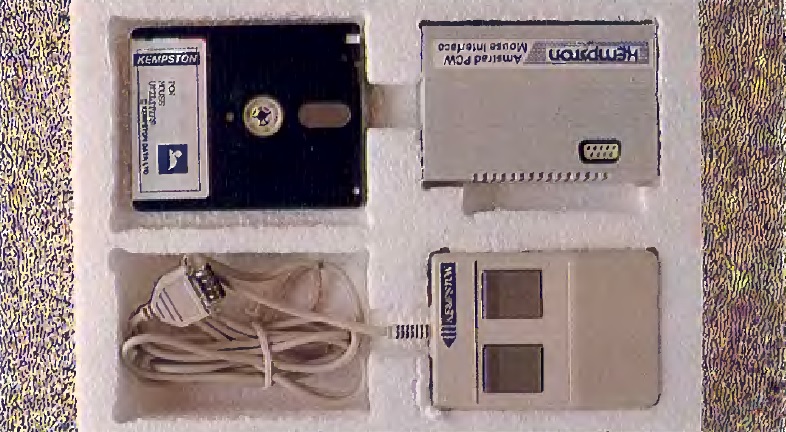
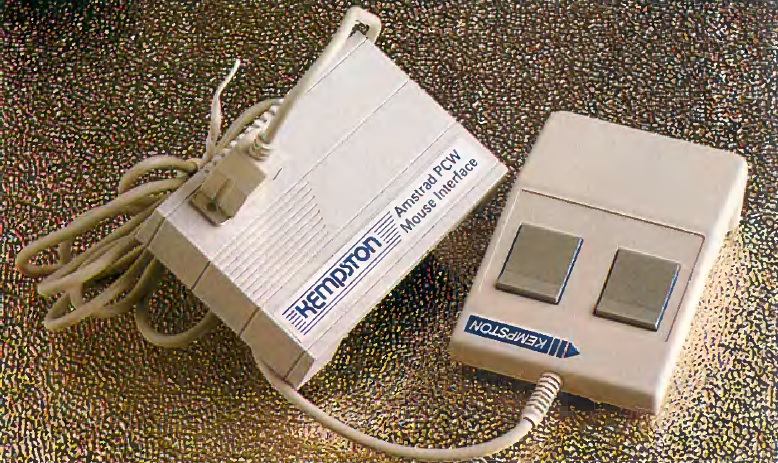
Original PackagingMouse DeviceGeneral Description
With the advent of the mouse, option selection systems and everything related to cursor movement on the screen ceased to be exclusively keyboard functions. Given the advantages presented by this new peripheral—comfort, ease of use, and speed—users opted to lean toward applications that included this complement.
In reality, out of the three elements that make up the system (interface, software, and mouse), only the interface was produced by Kempston. To develop the software, the services of HiSoft were used, and the mouse itself is a model by Logitech, the Swiss brand renowned for the high-quality build of its products.
The entire bundle comes presented in a voluminous white polystyrene box. The installation of the mouse is straightforward and quick.
First, the interface must be connected to the expansion port located at the rear of the machine (remember that any connection or disconnection to this slot must be done strictly with the computer turned off). After this, all that remains is to "plug" the mouse into the nine-pin connector built into the interface and activate it using the driver found on the utility disk supplied with the mouse itself.
In addition to the mouse controller, this disk contains a small program to verify the proper operation of the peripheral and some GSX drivers for handling graphics. But let's take it one step at a time.
The controller is a terminate-and-stay-resident (TSR) program that makes the mouse emulate the cursor movement keys, as well as the ALT+C and ALT+R keys (left and right button respectively). Furthermore, mouse sensitivity is also handled by this software, expressed on a scale from two to nine, though the factory default value is four. All these parameters can be modified either temporarily or permanently, meaning you can configure whether the new values are saved to disk or not.
This way, it would be possible to make the mouse work with practically any program, as it would be enough to map the keys emulated by the mouse according to the ones used by the application in question. Although, obviously, this is not compatible with direct-boot software. Nevertheless, it has been observed that certain software ignores the mouse entirely, even though it generates the same serial signal as the keys used by the program.
It is also worth highlighting KTEST, the program that allows verifying the mouse operation. The practical utility of this software is not overly extensive, though it is always handy for setting the mouse sensitivity level and auditing which keys are mapped.
Finally, the GSX drivers allow the mouse to work without major issues with all those applications that make use of this graphical extension under CP/M. The installation process is somewhat more complex and, in a sense, specific to each program.
Regarding the hardware, it consists of two parts: the interface and the mouse itself. The interface is simply a white box with an edge connector for the expansion bus and a nine-pin output socket. Its interior could not be simpler: a double-sided printed circuit board with a series of integrated circuits, including some RAM modules.
The mouse, as previously mentioned, is manufactured by Logitech, featuring a detail that quickly surprises: its very light weight. The mechanism is optomechanical, meaning that as the mouse moves, it rotates two small slotted wheels that interrupt internal light beams, which in turn indicate the direction and speed of movement to the computer. To detect if either of the two buttons has been pressed, the mouse utilizes two small microswitches.
Initially, mice emerged as another element within a whole way of understanding the human-machine interface, serving as the cornerstone of so-called VIMP environments (windows, icons, mouse, and pointer). Despite this, the advantages of using these input devices for other tasks have been proven time and again. While it might not be strictly clear why a database or word processor user would need a mouse, it is highly suitable for all types of design work, and this is where the GSX graphics extension support becomes particularly interesting.
It is, without a doubt, an interesting peripheral with multiple applications. The ease of adapting it to different environments makes it virtually compatible with almost all software existing today. Furthermore, it is a well-manufactured product backed by a major name in the world of computer peripherals.
Some of the compatible software titles that actively work with the Kempston Mouse include:
- Star Glider
- Wordstar
- SuperCalc 2
- All Hisoft software
- Cyrus II
- Cracker 2
- Data Fax
Specifications and Ports (Extras)
The Kempston Mouse interface utilizes three Input/Output ports (208, 209, and 212) for its operation, detailed below:
| Dec Port | Hex Port | Concept / Register |
|---|---|---|
| 208 | 0D0h | Mouse X coordinate (Horizontal axis position, range 0-255). Can also be read from 0D2h. |
| 209 | 0D1h | Mouse Y coordinate (Vertical axis position, range 0-255). Can also be read from 0D3h. |
| 212 | 0D4h | Mouse button state (Mapped across 2 bits. Returns 0 if pressed, 1 at rest. Bit 0 = Left; Bit 1 = Right. Other bits return 1). |
en/hardware/perifericos/kempston_mouse.1778738761.txt.gz · Última modificación: por jesus